Designing a Cycloidal Drive
A cycloidal drive turns a small wobble and a one-tooth count mismatch into a large, smooth, backlash-resistant reduction, making it exceptionally good for applications that demand accuracy and high torque density. This guide walks through the design process as a chain of decisions — each number you choose hands you the next. At the end, we derive the governing equations, and the built-in interactive rotor profile generator turns your parameters into the parametric equations you'll need. The goal is to help you not only understand the math behind the cycloidal drive but also follow the proper sequence of the design process.
Contents
How it works
Four parts do all the work. An eccentric input shaft (the cam) is connected to the cycloidal disc (the rotor). As the shaft rotates, the rotor rolls against the fixed ring pins, turning in the opposite direction of the input shaft and at a much slower speed as it orbits the central axis. This motion is then captured by the output flange, whose pins sit in the rotor's output holes.
The trick behind the reduction ratio is the number of fixed ring pins relative to the number of lobes on the rotor. The rotor always has exactly one fewer lobe than there are ring pins. As the camshaft drives the rotor around its orbit, the lobes can never line up with the pins all the way around. Consequently, with each full turn of the input shaft, the rotor — and therefore the output flange — rotates in the opposite direction by exactly one lobe. The reduction ratio for a cycloidal gearbox is therefore 1 / (N − 1), where N is the number of fixed ring pins. That means a 10 : 1 drive would have 11 ring pins and 10 lobes.
The geometry of a cycloidal gearbox ensures that roughly half the lobes are engaged at once. This improves stability, reduces backlash, and shares the load — which is why these drives can be so compact while still handling high torque and sudden shocks.
It's not all perfect, though. At high speeds, the orbiting motion of the rotor can cause vibrations. This is why a second rotor is often added to the camshaft, offset 180 degrees from the first, so that the two orbiting masses counteract each other. The second rotor is discussed in more detail in the design process section.
The design process
The whole design is a chain: you make one decision, and the math hands you the next. Here is that chain, end to end, in plain terms.
Step 1Choose the reduction
Lobes = the reduction; ring pins = lobes + 1. The reduction your application needs fixes both the lobe count and the pin count at once. Nothing else is decided yet, but the counts are now locked.
Step 2Set the size with R
The pin-circle radius R is the master dimension. The equally spaced ring pins lie on a circle of this radius. Decide how big the drive can be, and you have effectively set its outer diameter — a little over 2R once you add the ring pins and the housing. Once you have chosen R to fit your space, the guesswork is done.
Step 3Derive the eccentricity E and roller radius Rr
With R and N fixed, the two shape numbers follow. The eccentricity E can now be calculated. It must stay below R / N, or the rotor profile will develop self-intersecting cusps. A good place to start is half that limit, E ≈ R / (2N). In general, it's best to set E as high as possible before cusps form, because a larger eccentricity increases the lever-arm distance and thereby reduces the forces on the camshaft and the ring pins. The roller radius Rr sets the size of each pin; a good range is R / (1.5N) to R / N. Larger rollers spread the contact stress better and last longer, but they flatten the lobes, and if pushed too far, they make a valid lobe profile impossible to generate.
Step 4Generate the rotor profile
Four numbers define the curve. With R, Rr, E, and N in hand, feed them into the equations in §3 and sweep the parameter t from 0 to 2π to trace the complete lobed outline. To make this easier, plug your parameters into the interactive generator below, and it will output the parametric equations for you to paste into your CAD software. Use the CAD-package buttons to format the arctangent function for your specific program — SolidWorks, Fusion 360, Inventor, Creo, and others.
Step 5Add necessary features to the rotor
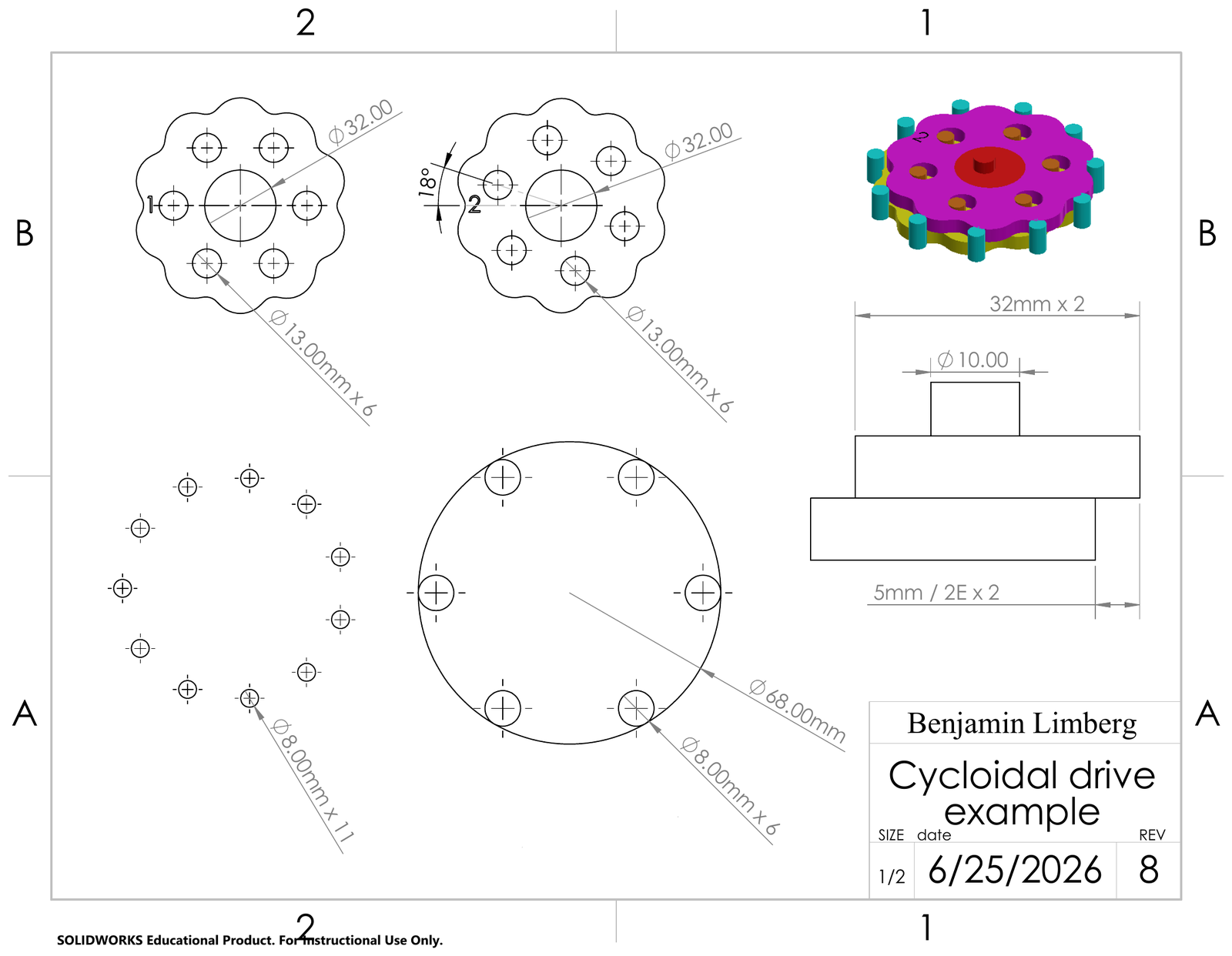
Bore and output holes go in before you extrude. Once you have the rotor profile, it's a good idea to create the center bore and the output holes — which capture the rotational motion — before extruding the sketch. The diameter of the output pins (Rpin) that transmit motion to the output flange is arbitrary; that said, a larger diameter handles stress better. The output holes, on the other hand, must be larger than their pin by exactly the orbit (one eccentricity), so that the wobble is absorbed while rotation passes through: Rhole = Rpin + E. The radius on which these output holes sit, Rout, is entirely dependent on your design. Add four or more output holes, evenly spaced around Rout, so the load is shared among the output pins.
Step 6Add a second rotor
A second rotor cancels the wobble — but you must clock its holes. With only one rotor orbiting the central axis, vibration becomes a problem, especially at high speeds. The fix is to add a second rotor to the camshaft, offset 180 degrees from the first, so that the two orbiting masses cancel. Before you duplicate the first rotor, though, you need to make one change. The cycloidal profile can stay the same, but the output holes of the second rotor must be rotated by 180 / (N − 1) for the output holes of the two rotors to align.
how far to rotate the second rotor's output holes
Because the output timing depends on this alignment, applying the correct angular offset to the second rotor's output holes is essential.
Step 7Designing the camshaft
Two cam journals, 180° apart, each offset by E. In a two-rotor configuration, the input shaft must have two cam journals, each offset from the central axis of the shaft by exactly E. Make sure the second cam is offset 180 degrees from the first.
Step 8Designing the output flange, and notes on the housing
The flange's pins match the rotors' output holes. At this point, you should have two completed rotors and a camshaft. The next step is to capture their motion with an output flange. Because the output flange allows so much design freedom, this guide covers only its required elements: the pins must sit on the same Rout radius as the output holes in the rotors, and the pin radius must equal Rpin from Step 5. The housing likewise allows a great deal of design freedom, and because the modifications needed to fit a given application vary so widely, this guide does not cover how to design it.
The governing equations
The rotor edge is a cycloidal curve offset by the roller radius, and it is built from just the four numbers you set — the pin count N, the pin-circle radius R, the eccentricity E, and the roller radius Rr. Sweep t from 0 to 2π to draw one full disc; t is only the sweep variable, not something you choose. For readability the repeated arctangent term is named the contact angle, ψ.
Most CAD packages take an equation-driven curve directly. The single-expression form below is ready to paste; it's shown with a generic arctan, and the interactive generator in §4 rewrites that function name to match your specific CAD package. Set the sweep to t = 0 to 2*pi.
Interactive rotor generator
Set the parameters and the rotor redraws live, auto-scaled to fit. Every control pairs a slider with a number box — drag, or type an exact value that carries straight through to the exported equation. Four numbers set the shape — lobes, R, Rr and E: E is held under the undercut limit (R/2N–R/N), and Rr below where neighbouring rollers touch (R·sin(π/N)), both ceilings tightening as you add lobes. Three controls set the output pins (capped at R), and one opens the central bore. When it looks right, export the exact rotor on screen as a DXF or CSV, or copy the parametric equation formatted for your CAD package.
Parameters & their effects
Four quantities define the rotor — N, R, Rr and E. (The sweep variable t isn't a design value; it just runs 0 → 2π to trace the curve.) What matters in practice is how each one changes the behaviour of the gear.
| Symbol | What it is | How it affects the gear |
|---|---|---|
| N | Number of ring pins (lobes = N − 1) | Sets the reduction (N − 1) and the lobe count. More pins → higher ratio with more, smaller, shallower lobes that share load smoothly; fewer pins → lower ratio with deeper, more aggressive lobes. |
| R | Pin-circle radius | The master size dimension — fixes the outer diameter (≈ 2R). Larger R means a bigger, stronger, higher-torque drive but more bulk and weight. |
| Rr | Roller (ring-pin) radius | Larger rollers spread contact stress and improve durability, but shallow the lobes and reduce usable profile. The hard upper limit is where neighbouring rollers touch, R·sin(π/N) — so it tightens as lobe count rises; the recommended band is R/(1.5·N) to R/N. |
| E | Eccentricity | The torque lever. Larger E deepens the lobes for more torque capacity and bigger output holes, but raises the pressure angle and contact forces (more stress and vibration). Keep it between R/2N and the R/N limit. |